Google Drive for Work vs Personal: Differences
Google Drive personal accounts and Google Workspace look similar but work very differently. Here's what changes — and when upgrading actually matters.
Overdrive Team//4 min read
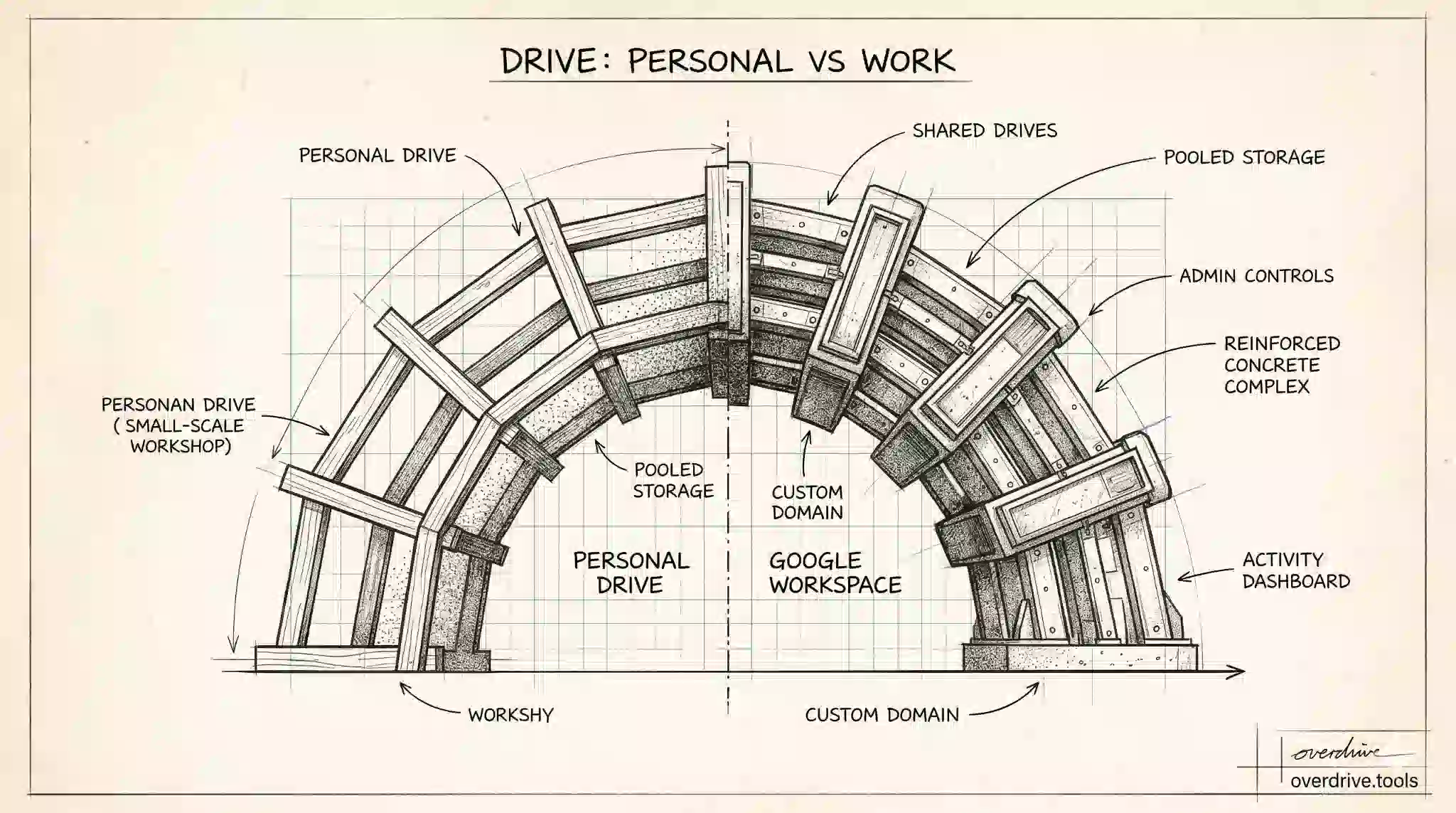
If you've used Google Drive on a personal Gmail account, switching to a Google Workspace account at work feels immediately familiar — the interface looks nearly identical. But the underlying capabilities are quite different. Understanding what changes in Workspace, and what stays the same, helps you decide whether a personal account is sufficient for your needs or whether the Workspace features actually matter.
What's the Same
The core functionality of Google Drive works identically on both account types. Creating and editing Google Docs, Sheets, Slides, and Forms; uploading and downloading files; sharing links; collaborating in real time; and using Google Meet for video calls all work the same way regardless of whether you have a personal or Workspace account.
If you're a freelancer or individual user who primarily needs document creation and basic file sharing, a personal account does everything you need. Google One plans extend your personal storage up to 2 TB for $9.99/month, which is sufficient for most individual use cases.
Storage
Free personal accounts get 5 GB by default (up to 15 GB with a verified phone number) shared across Gmail, Drive, and Photos. Upgrading to Google One increases that pool at a personal level.
Google Workspace accounts get pooled organizational storage. Business Starter includes 30 GB per user, Business Standard includes 2 TB per user, and Business Plus and Enterprise tiers go higher. This storage is allocated per user but pooled across the organization — heavy users draw from a shared reserve rather than hitting a hard per-account wall.
For teams with many users, pooled storage is meaningfully more flexible than personal Google One plans, where each person manages their own storage independently.
Shared Drives
Shared Drives — formerly called Team Drives — are exclusively a Workspace feature. They don't appear on personal Google accounts at all.
The practical difference is significant for teams. Files in a Shared Drive belong to the organization, not to the individual who created them. When someone leaves, their files stay in place. Access is managed at the drive level with consistent membership roles. For teams that need file continuity beyond any individual contributor's tenure, Shared Drives are one of the most compelling reasons to use Workspace.
Admin Controls and Security
Workspace adds a layer of organizational control that personal accounts don't have. Administrators can manage users centrally, enforce password policies, control which third-party apps have access to Drive, set data retention rules, enable or restrict external sharing organization-wide, and recover deleted files on behalf of users within a 25-day window after permanent deletion.
For regulated industries or organizations with compliance requirements, Workspace Enterprise tiers also include Google Vault for eDiscovery, litigation holds, and audit logging — none of which exist for personal accounts.
Custom Domain Email
Workspace provides email at your own domain: yourname@yourcompany.com rather than yourname@gmail.com. This isn't directly a Drive feature, but it matters in a business context because access to shared files, calendar invites, and collaboration is tied to your account identity. Using a professional domain email is standard practice in most organizations, and Workspace is the path to that with Google.
Personal accounts can only use gmail.com addresses.
Activity Dashboard and Audit Logs
Workspace accounts include access to the Activity dashboard in Google Docs, Sheets, and Slides, which shows who has viewed a file and when. Personal accounts can see who has edited or shared a file, but not who has viewed it.
Workspace admins additionally have access to organization-wide Drive audit logs through the Admin Console, showing every significant file action across the entire account — useful for security investigations and compliance reporting.
Meet Recordings
Video call recordings made in Google Meet are stored directly in Google Drive. On personal accounts, Meet recording is available, but with limitations on length and access. On Workspace accounts, recordings go into the organizer's Drive automatically and can be shared with participants. For organizations that regularly record meetings for documentation or async access, this integration is convenient.
When the Upgrade Makes Sense
A personal account plus Google One is the right call for individuals, freelancers, students, and small informal groups where file ownership continuity, admin controls, and compliance aren't concerns. The features are sufficient and the cost is lower.
Workspace becomes genuinely valuable when: you need Shared Drives for team-owned files, you need a custom domain email, you're in an industry with data retention or compliance requirements, or you need admin visibility into how company files are being accessed and shared.
For teams already using Workspace, getting the most value from those admin and permissions features is what tools like Overdrive are built around — auditing who has access to what across your organization's Drive, finding externally shared files, and cleaning up permissions that have accumulated over time.
Related Articles
- Shared Drive vs My Drive: Key Differences
- Google Drive vs Google One: What's the Difference?
- Google Drive vs SharePoint for Small Teams