Google Drive vs Google One: What's the Difference and Why It Matters
Google Drive and Google One sound like the same thing but they're not. Here's exactly how they relate to each other—and why the confusion costs people money.
Overdrive Team//5 min read
If you've ever stared at a storage warning on your Google account and clicked through to upgrade, you've probably noticed that the thing you're upgrading isn't quite called "Google Drive." It's called Google One. And if you've wondered what that actually is—and how it relates to the Drive you use every day—you're not alone. Google has done a genuinely poor job of explaining this.
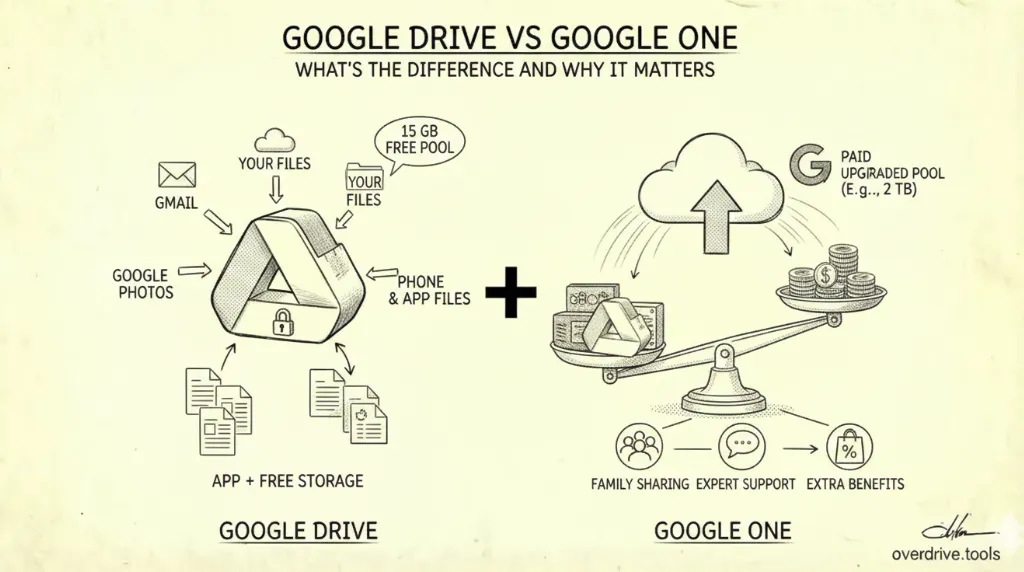
Here's the clearest way to think about it: Google Drive is a place. Google One is a subscription. They're not competing products—they work together. But understanding exactly how changes the decisions you make about storage, sharing, and whether upgrading is worth it.
What Google Drive Actually Is
Google Drive is Google's file management application. It's where you upload, organize, share, and access files. It also underpins Google's suite of editing tools—every Doc, Sheet, and Slide you create lives in Drive, even if you never think of it that way.
Drive comes with every Google account, free. There's no paid version of Drive itself. The app is the app—what you're paying for when you upgrade is never Drive specifically.
Drive is also just one of three Google services that share your storage quota. The other two are Gmail and Google Photos. This is the detail most people miss: your 15 GB of free storage doesn't belong exclusively to your Drive files. Every email attachment in Gmail and every photo backed up to Photos eats from the same pool.
What Google One Actually Is
Google One is a paid subscription that expands that shared storage pool—and bundles in a handful of other benefits. When you hit your 15 GB limit and go to upgrade, you're buying a Google One plan. The extra space becomes available across Drive, Gmail, and Photos simultaneously. You don't allocate it—it just becomes the new total.
Google One launched in 2018, when Google replaced the old "Google Drive storage plans" with a unified subscription that covered all Google services, not just Drive. The rebrand made sense internally but created lasting confusion externally, since most people's mental model of their Google storage was "Drive storage."
The current plans, in the US, look like this:
| Plan | Storage | Monthly price |
|---|---|---|
| Free | 15 GB | $0 |
| Basic | 100 GB | $1.99 |
| Standard | 200 GB | $2.99 |
| Premium | 2 TB | $9.99 |
| AI Pro | 2 TB + Gemini Advanced | $19.99 |
| AI Ultra | 30 TB + Gemini Advanced | $249.99 |
Annual billing is available on most plans and works out to a modest discount.
What Google One Includes Beyond Storage
Storage is the main reason most people subscribe, but Google One plans come with a few other things worth knowing about.
Family sharing. With any paid plan, you can share your storage with up to five additional people in a family group—six total including yourself. Each person keeps their own account and their own files; they just draw from the same expanded pool. This is one of the most underused features. A 200 GB plan at $2.99/month split across a family of four costs less than a dollar per person.
Expert support. Paid plans include access to Google support specialists via chat, phone, or email. On free accounts, Google's support options are limited to community forums and help documentation.
Google Photos editing tools. Features like Magic Eraser—which uses AI to remove unwanted objects from photos—are included with Google One subscriptions rather than available to all users.
Google Store rewards. Higher-tier plans include cashback on purchases from the Google Store. The 200 GB plan gets 3% back; the 2 TB and above plans get up to 10%.
Note on VPN: Some older sources list "Google One VPN" as a plan benefit. This feature was discontinued in June 2024 and is no longer included with any plan.
The Storage Quota: What Counts and What Doesn't
This is where people get surprised. Your quota—whether you're on the free 15 GB or a paid plan—is consumed by:
- Files you own in Google Drive (uploaded photos, PDFs, ZIPs, videos, etc.)
- Gmail messages and attachments
- Photos and videos backed up to Google Photos
- Certain Google Workspace file types in specific scenarios
What doesn't count against your quota:
- Google Docs, Sheets, Slides, and Forms created natively (these are zero-byte in terms of quota)
- Files shared with you that you don't own—only the owner's quota is affected
- Items in your "Shared with me" view
This is why someone can run out of storage even though their Drive looks relatively empty. Gmail alone—years of emails with attachments—can silently consume gigabytes. Google Photos is often the larger culprit, especially for people who back up photos in original quality rather than storage-optimized mode.
Before paying for more Google One storage, it's worth understanding exactly where your current quota is going. Overdrive can break down what's using your Drive space by file type and folder, which often reveals deletable files before you ever need to upgrade.
The Common Confusion Points
"I bought more Google Drive storage." What you actually bought was a Google One plan. The storage shows up in Drive, Gmail, and Photos—not just Drive. This matters because cleaning up Gmail or Photos can free storage that affects what you see in Drive.
"My storage is full but I barely use Drive." Very possible. Check Gmail and Photos before assuming the problem is in Drive. Gmail's search operator has:attachment larger:5mb is a fast way to find large email attachments. In Google Photos, check whether "Storage saver" mode is on—original quality photos are significantly larger.
"I deleted files from Drive but my storage didn't change." Two likely causes: the files are still in Trash (which counts against your quota until you empty it), or the storage that's full isn't Drive—it's Gmail or Photos.
"Can I use Google One just for Drive?" No. The storage is pooled. You can't allocate it to a single service. If you want to store large files in Drive and keep Gmail and Photos lean, you can—but the quota works as a shared total regardless.
When Upgrading Actually Makes Sense
A Google One subscription is worth it if:
- You're routinely hitting your storage limit and cleaning up isn't solving it
- You want to share storage with family members (the math gets favorable quickly)
- You back up photos or videos in original quality and have a large library
- You actively use Gmail and have years of attachment-heavy email history
It's probably not worth it if:
- You haven't audited what's actually consuming your current storage
- Your Drive is mostly Google Docs, Sheets, and Slides (which don't count toward quota)
- You could free enough space by deleting old Gmail attachments or clearing Drive trash
The 100 GB plan at $1.99/month is one of the better deals in consumer software for what it covers. But paying for more storage before understanding why the current storage is full tends to just defer the problem.
The Relationship in One Sentence
Google Drive is the app where your files live. Google One is the subscription that determines how much space those files—and your Gmail and Photos—are allowed to take up.
Everything else flows from that.
Related Articles
- Google Drive Storage Limit Explained: Free, Paid Plans & What Counts
- Google Drive Storage Full? Here's Why (and How to Fix It)
- The Ultimate Google Drive Storage Cleanup Guide (2026)