Does Google Photos Use Google Drive Storage?
Yes. Google Photos, Drive, and Gmail share one storage pool: 5 GB free by default, up to 15 GB with a linked phone number. Here's how it works.
Overdrive Team//7 min read

Yes. Google Photos, Google Drive, and Gmail all share the same storage pool. Every photo and video you back up to Google Photos counts toward the same free storage allowance as your Drive files and Gmail emails. And that allowance is smaller than it used to be: since May 2026, Google accounts get 5 GB free by default, with the full 15 GB available at no cost only after you verify a phone number on the account.
This confuses a lot of people — largely because it hasn't always been this way, and because Google Photos and Google Drive look and feel like completely separate products.
Why People Think They're Separate
For years, Google Photos offered free unlimited storage for photos backed up in "High quality" mode (later renamed "Storage saver"). That changed on June 1, 2021. Since then, every photo and video backed up to Google Photos — regardless of quality setting — counts against your Google Account storage.
If you've been using Google Photos since before 2021, you may have a large backlog of photos that accumulated under the old unlimited plan. Those older photos are grandfathered in and don't count against your storage. But anything backed up after June 1, 2021 does.
How Google Storage Works
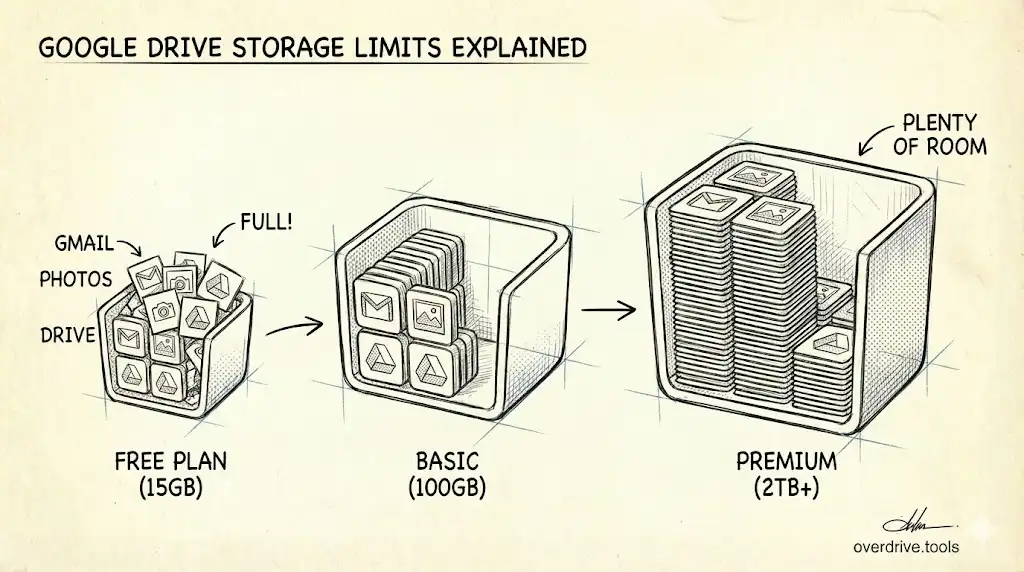
Your Google Account comes with a single pool of free storage: 5 GB by default, or up to 15 GB once a phone number is linked to the account (Google changed this in May 2026, and its official wording is now "up to 15 GB"). That pool is shared across:
- Google Drive — documents, spreadsheets, presentations, uploaded files
- Gmail — emails and attachments
- Google Photos — photos and videos backed up to the service
All three draw from the same pool. If Google Photos is full of videos from your phone, your Drive has less space for files. If Gmail is packed with large attachments, both Drive and Photos feel the squeeze.
To see how your storage is currently split, go to one.google.com/storage. It shows a breakdown of how much each service is using.
Google Photos Is Often the Biggest Storage Consumer
For most people, Google Photos is responsible for the majority of their Google storage usage — often without them realizing it. A modern smartphone camera produces photos that are 3–10 MB each, and videos can be much larger. A few years of automatic phone backup adds up quickly.
If your Google storage is full or nearly full and you're not sure why, Google Photos is usually the first place to check.
What You Can Do About It
Option 1: Free up space in Google Photos
Google Photos has a built-in tool called "Free up space" (under Settings → Manage storage) that removes photos from your phone that have already been backed up. This frees local storage on your device, but doesn't reduce your Google account storage.
To actually reduce your Google account storage, you need to delete photos and videos from Google Photos itself. Go to your Photos library, select what you want to remove, and delete. Items go to the Trash in Google Photos and are permanently deleted after 60 days, or immediately if you empty the Trash manually.
Option 2: Switch to Storage Saver quality in Google Photos
If you're backing up photos in "Original quality," switching to "Storage saver" can dramatically reduce how much new storage Photos consumes going forward. Storage saver compresses photos slightly — to a maximum of 16 megapixels — and videos to 1080p. For most people, the quality difference is invisible on screen, and the storage savings are significant.
To change this setting: open Google Photos → tap your profile icon → Photos settings → Backup → Backup quality → select Storage saver.
Note: switching quality only affects new backups. It doesn't compress your existing backed-up photos. To compress existing photos, go to Photos settings → Manage storage → Compress existing photos.
Option 3: Free up space in Google Drive
If Drive files are eating your storage, Overdrive can scan your Google Drive and identify the largest files, duplicate files, and other clutter so you can decide what to remove. Clearing space in Drive directly frees up the shared storage pool — which gives Google Photos more room.
Option 4: Upgrade storage
Google One plans start at 100 GB for $1.99/month, with a discount for annual billing, shared across Drive, Gmail, and Photos. If you genuinely need more storage rather than just needing to clean up, upgrading is the straightforward path.
Does Deleting from Google Photos Also Delete from Google Drive?
Not automatically. Google Photos and Google Drive are separate services that share storage space, but deleting a photo from one doesn't delete it from the other — unless the photo lives in both places and you delete it from both.
One exception: if you added a photo to Drive from Photos (or vice versa), each copy counts toward your storage separately. Deleting the Drive copy doesn't delete the Photos copy.
What Counts Toward Storage in Google Photos
Not everything in Google Photos necessarily counts against your quota. Here's the breakdown:
Photos and videos backed up after June 1, 2021 always count, regardless of quality setting. Photos backed up before June 1, 2021 in "High quality" (now Storage saver) mode were grandfathered in under the old free unlimited plan and do not count. Photos backed up before June 1, 2021 in Original quality do count.
Shared albums are a common point of confusion. If someone shares an album with you and you save photos from it to your library, those copies count against your storage. If you're just viewing the shared album without saving, they don't count.
Google Photos also includes a Trash folder. Deleted photos stay there for 60 days and continue to count against your storage until they're permanently removed — either by emptying the Trash manually or waiting for automatic deletion.
How to Find What's Consuming Storage in Google Photos
Google Photos provides a storage management view at photos.google.com/settings/storage. From there you can see:
- How much storage Photos is using versus Drive and Gmail
- A breakdown of blurry, dark, and duplicate photos worth deleting
- Screenshots and other large files that may be safe to remove
- Videos (usually the largest storage consumers individually)
For Drive specifically, Overdrive gives you a size-sorted view of everything in your Drive so you can see at a glance what's taking up the most space. This is particularly useful when Google's storage warnings are pointing at Drive rather than Photos.
Does Google One Help With Photos Storage?
Yes. A Google One subscription increases the storage pool shared across Drive, Gmail, and Photos. The 100 GB plan ($1.99/month) is usually sufficient for someone who has a few years of phone photos and normal Drive use. The 2 TB plan is better suited for people who back up large quantities of video or have very active Drive usage.
Before upgrading, it's worth checking whether the issue is actually storage shortage or just accumulated clutter. Years of screenshots, blurry photos, and duplicate shots can easily add up to several gigabytes. Clearing those first may be enough to avoid needing to upgrade.
The Practical Takeaway
If you're hitting your storage limit and aren't sure where it's all going — check Google Photos first. For most users, it's the largest single consumer of Google storage, and it's easy to lose track of years of automatic phone backups quietly filling up your quota. Switching to Storage saver quality for future backups, compressing your existing library, and periodically clearing deleted items from Trash are the three habits that keep Photos from becoming a runaway storage problem.
Frequently Asked Questions
Can I move photos from Google Photos to Google Drive to save space? Moving photos between the two services doesn't save storage — it's the same shared pool. The only way to reduce your Google storage usage is to delete content or download it to local storage outside your Google account.
Do Google Photos Live Photos count as more storage than regular photos? Live Photos (from iPhone) are backed up as a still photo plus a short video clip. Both count toward storage, so Live Photos use slightly more space than standard photos. If storage is a concern, some people choose to back up the still version only.
If I delete my Google Photos library, does my Drive get more space? Yes. Since they share the same storage pool, deleting content from Photos frees up space that Drive and Gmail can use, and vice versa.
Does having Google Photos on my phone automatically back everything up? If backup is turned on in the Google Photos app settings, yes — your phone's camera roll is backed up automatically over Wi-Fi (and optionally over mobile data). You can pause backup, change quality, or disable it entirely in the app settings.
Related Articles
- Why Is My Google Drive Full But Empty?
- Google Drive Storage Limit Explained: Free, Paid Plans & What Counts
- The Ultimate Google Drive Storage Cleanup Guide